Best Kling AI Alternatives in 2026: Top Options for AI Video Generation
Kling AI has made waves in the AI video generation space. Developed by Kuaishou (the company behind Kwai), it produces some of the most realistic image-to-video results available today. When you want a photo to come alive with natural motion and cinematic quality, Kling delivers.
But for many users, Kling AI isn’t quite the right fit.
Maybe you’ve struggled with the credit system—never quite sure how much a generation will cost or when you’ll run out. Maybe the interface felt overwhelming with too many options. Or maybe you have a specific goal in mind: you don’t need Hollywood-quality AI video generation, you just want to animate some family photos for mom’s birthday.
Whatever brought you here, let’s find your perfect alternative.
 Sometimes you don’t need cinematic AI—you need something that creates genuine emotion.
Why people look for Kling AI alternatives
1. The credit system creates friction
Like most AI video tools, Kling uses a credit-based system. This sounds simple in theory, but in practice:
- You’re never quite sure how many credits a generation will consume
- Complex scenes eat credits faster than simple ones
- Running out mid-project means stopping to buy more
- The mental overhead of “is this worth the credits?” kills creativity
For something that should be fun and emotional—like creating a video for your parents’ anniversary—constantly watching credits feels wrong.
2. Complexity when you want simplicity
Kling is powerful. It offers:
- Multiple generation modes
- Fine-tuned motion controls
- Style and aesthetic settings
- Resolution and duration options
- Camera movement presets
This is fantastic for professional creators. But if you just want to turn five photos of grandma into a video with nice music? You’re navigating a cockpit when you need a remote control.
3. General purpose vs. emotional purpose
Kling can generate almost anything: product videos, social media content, artistic pieces, commercial work. But this jack-of-all-trades approach means it’s master of none.
For family memories specifically:
- No built-in music
- No gift-ready output
- No emotional pacing
- Results require post-processing
If your goal is to make someone cry happy tears, Kling gives you raw materials, not the finished product.
4. Origin and interface considerations
Kling was originally built for the Chinese market (Kuaishou). While English is now available, some users prefer tools built for Western audiences from the start—with pricing in familiar currencies and support in familiar time zones.
The best Kling AI alternatives in 2026
1. Revivaly ⭐ Best for family photos and emotional videos
Best for: Old photos, anniversary gifts, memorial tributes, birthday surprises
Revivaly doesn’t try to compete with Kling on general AI video. Instead, it focuses entirely on one thing: transforming your photos into emotional videos with music.
| Feature | Details |
|---|---|
| Price | €1 per photo (max €10), photos 11-20 free |
| Output | Complete video with music and transitions |
| Delivery | ~5 minutes |
| Subscription | None |
The experience matters
Here’s the Revivaly process:
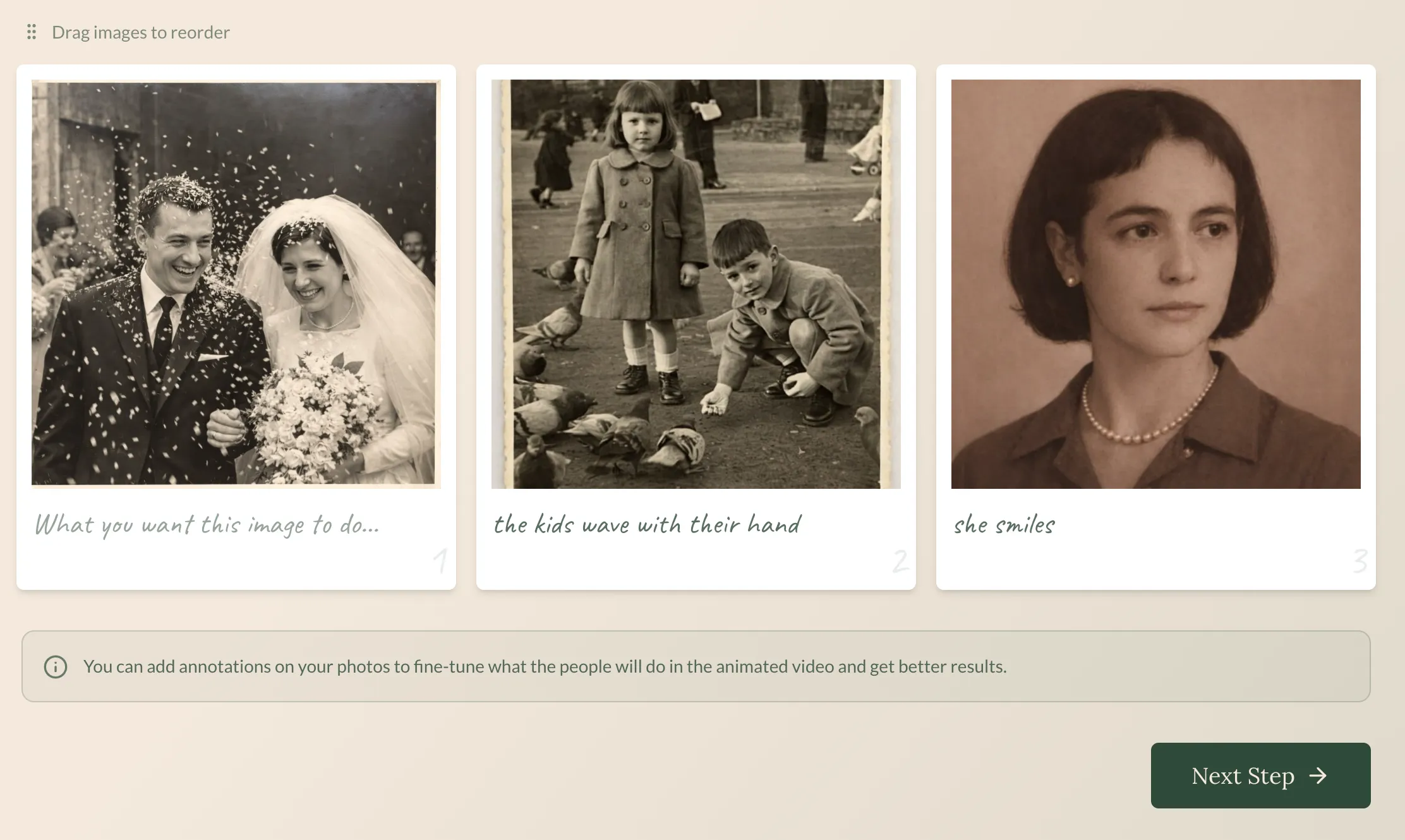 Step 1: Upload your photos. The interface is designed for the non-technical.
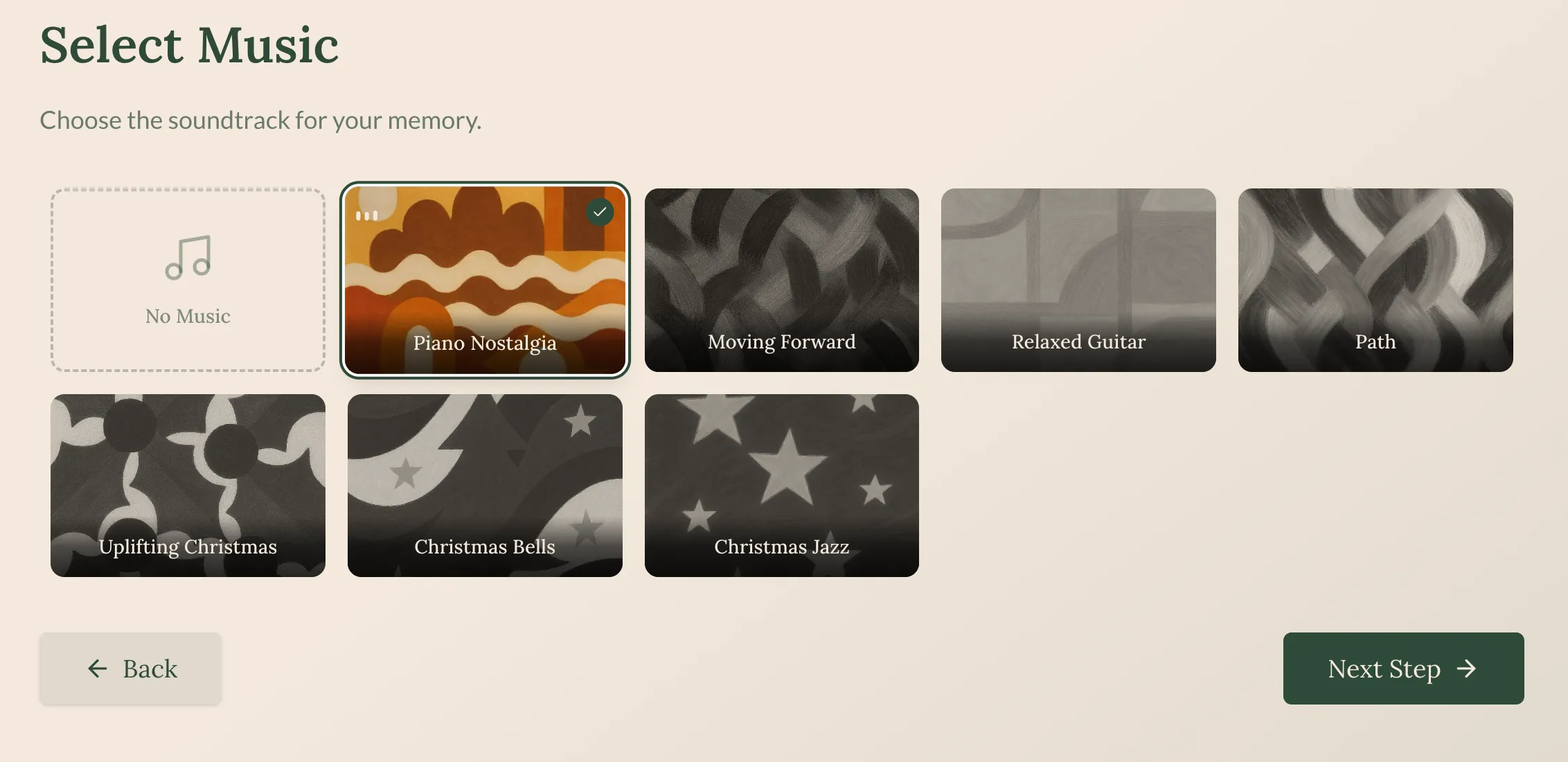 Step 2: Choose music that matches the mood—no audio editing required.
 Step 3: Your complete video is ready in about 5 minutes.
See what you get
This is what a finished Revivaly video looks like:
Real family photos transformed into a shareable tribute.
Why choose Revivaly over Kling
| Kling AI | Revivaly |
|---|---|
| Credit system (track usage) | Per-photo pricing (€1 each) |
| General purpose | Emotion-focused |
| No music | Curated soundtracks |
| Raw output (needs editing) | Gift-ready result |
| Learning curve | Zero learning curve |
| Professional tool | Personal tool |
Best for: Anyone creating video for family—anniversaries, memorials, birthdays, tributes.
Limitations:
- Not for general AI video (that’s not the goal)
- No text-to-video
- Limited creative control (simplicity is the point)
2. Hailuo AI (MiniMax)
Best for: Fast generation, Kling-like quality
Hailuo is Kling’s closest direct competitor. Built by MiniMax, it offers similar image-to-video capabilities with a focus on speed.
| Feature | Details |
|---|---|
| Price | Credits |
| Speed | Very fast (faster than Kling) |
| Quality | Good (not quite Kling-level) |
The tradeoff: Hailuo sacrifices a bit of quality for significantly faster generation. If you’re iterating on ideas or need quick turnaround, this matters.
The good:
- Fastest generation times in category
- Quality close to Kling
- Active development (V2.3 recently released)
- Similar feature set
The not-so-good:
- Still uses credits
- Still general purpose (no emotional focus)
- Still requires post-processing
Best for: Users who want Kling-like capabilities but value speed over maximum quality.
3. PixVerse
Best for: Advanced creative features
PixVerse has pushed the boundaries of what image-to-video AI can do. Their V5.6 model includes native audio generation, lip-sync, and multi-character scenes.
| Feature | Details |
|---|---|
| Price | Freemium with credits |
| Features | Lip-sync, audio, multi-shot |
| Quality | Very good |
The good:
- Native audio generation (unique feature)
- Multi-shot narratives
- Style transfer and effects
- Free tier available
The not-so-good:
- Credit system
- Learning curve for advanced features
- Results vary (requires curation)
Best for: Creative professionals who need cutting-edge AI video features.
4. Runway
Best for: Professional filmmakers
Runway is the industry standard for AI video in professional contexts. Their Gen-4 model produces cinematic results that have been used in actual film and television production.
| Feature | Details |
|---|---|
| Price | $15-$95/month |
| Quality | Industry-leading |
| Focus | Professional creators |
The good:
- Best-in-class output quality
- Full creative control
- Professional toolset
- Trusted by studios
The not-so-good:
- Professional pricing
- Steep learning curve
- Overkill for personal projects
- Subscription required
Best for: Professional video editors and filmmakers.
5. Luma AI
Best for: Free experimentation
Luma’s Dream Machine offers a decent free tier, making it good for experimentation without commitment.
| Feature | Details |
|---|---|
| Price | Freemium + credits |
| Quality | Good |
| Free tier | Yes |
The good:
- Generous free tier
- Decent quality
- Low barrier to entry
The not-so-good:
- Credits for serious use
- General purpose
- No emotional focus
Best for: Users who want to experiment with AI video before committing money.
6. D-ID
Best for: Talking avatars
D-ID specializes in making photos “talk.” If your goal is creating a digital spokesperson or avatar, D-ID is purpose-built for this.
| Feature | Details |
|---|---|
| Price | $5.99-$299/month |
| Focus | Talking avatars |
| Use case | Business, presentations |
The good:
- Excellent talking avatar technology
- Business-focused features
- API available
The not-so-good:
- Subscription model
- Expensive for casual use
- Not for general video
- Not for emotional content
Best for: Business presentations, not personal memories.
7. MyHeritage Deep Nostalgia
Best for: Quick face animation
Deep Nostalgia specifically animates faces in old photos—making them blink, smile, and look around.
| Feature | Details |
|---|---|
| Price | Free tier + $13/month |
| Output | Face animation only |
| Duration | Few seconds |
The good:
- Free tier available
- Good with old/damaged photos
- Simple to use
- Part of genealogy platform
The not-so-good:
- Faces only (no full video)
- No music
- Can look uncanny
- Short clips only
Best for: Genealogy enthusiasts who want a quick face animation effect.
Real comparison: What do you actually need?
Here’s the honest breakdown by use case:
“I want to make a gift video for family”
| Tool | Rating | Why |
|---|---|---|
| Revivaly | ⭐⭐⭐⭐⭐ | Built for this. Music, simplicity, gift-ready. |
| Kling AI | ⭐⭐ | Too complex. No music. Requires editing. |
| MyHeritage | ⭐⭐ | Face only. No full video. |
| Others | ⭐ | Wrong tool for the job. |
”I want the best possible AI video quality”
| Tool | Rating | Why |
|---|---|---|
| Runway | ⭐⭐⭐⭐⭐ | Industry-leading quality. |
| Kling AI | ⭐⭐⭐⭐ | Excellent quality. |
| Hailuo | ⭐⭐⭐⭐ | Close to Kling, faster. |
| Revivaly | ⭐⭐ | Different focus (emotion over raw quality). |
”I want to experiment without paying”
| Tool | Rating | Why |
|---|---|---|
| Luma AI | ⭐⭐⭐⭐⭐ | Best free tier. |
| PixVerse | ⭐⭐⭐⭐ | Good free options. |
| MyHeritage | ⭐⭐⭐ | Limited free tier. |
| Revivaly | ⭐⭐ | No free tier (but €1-10 is cheap). |
Kling AI vs Revivaly: The detailed breakdown
Since both tools animate photos, here’s the direct comparison:
| Feature | Kling AI | Revivaly |
|---|---|---|
| Primary purpose | General AI video | Family memories |
| Pricing model | Credits | Per-photo (€1) |
| Music | Not included | Curated soundtracks ✓ |
| Output | Raw video | Gift-ready video ✓ |
| Learning curve | Medium-high | None |
| Generation time | Minutes | ~5 minutes |
| Post-processing needed | Yes | No ✓ |
| Best for | Creators | Regular people |
Choose Kling AI if:
- You need general-purpose AI video generation
- You want maximum creative control
- You plan to edit the output anyway
- You’re comfortable with credit systems
Choose Revivaly if:
- You’re making a video for family
- You want music included
- You need a gift-ready result
- You want zero complexity
Frequently asked questions
Is there a free Kling AI alternative?
For experimenting: Luma AI has the best free tier. PixVerse and MyHeritage also offer limited free options.
For actual use: Revivaly at €1-10 total is often cheaper than “free” tools that upsell you.
What’s the easiest Kling alternative?
Revivaly wins for simplicity. Upload photos, choose music, get video. No credits, no settings, no learning curve.
Which alternative has the best quality?
For pure video quality: Runway > Kling > Hailuo.
But “quality” depends on your goal. For emotional family videos with music, Revivaly produces better results even if the technical quality metrics differ.
Can I animate old family photos without Kling?
Yes! Several options:
- Revivaly: Complete video with music (best for sharing)
- MyHeritage: Face animation only
- Hailuo/PixVerse: General image-to-video
The bottom line
Kling AI is impressive technology. It produces some of the best AI video available, with control that professionals need.
But impressive technology isn’t always the right tool.
If you’re making something personal—a birthday surprise, an anniversary tribute, a memorial video—you don’t need Hollywood-grade AI. You need something that creates emotion, includes music, and produces a result you can share immediately.
That’s exactly what Revivaly does.
€1 per photo. Music included. No credits. Ready in 5 minutes.
Your photos deserve to become memories you share, not experiments in AI technology.
Last updated: February 2026
Ready to bring your own memories to life?
Create a Video Now